How to Repay a Loan

Pay your loan in a convenient way — in a mobile app or at a bank branch

Learn more
How to Repay a Loan

Repayment Methods

Choose the method that’s most convenient for you. The fastest way is through the mobile app: the payment is credited to your loan account immediately.

Mobile App

  • Monthly scheduled payments
  • Partial and full early repayment
  • Top up your account for automatic debit
<ul><li>Monthly scheduled payments</li><li>Partial and full early repayment</li><li>Top up your account for automatic debit</li></ul>

Branch teller window

Make a payment at any Ipoteka Bank OTP Group branch—in cash or by card. This option is also suitable for early repayment.

  • Monthly payment and early repayment
  • Top up your account for automatic debit
  • Payment by card or in cash in sum
<p>Make a payment at any  Ipoteka Bank OTP Group branch—in cash or by card. This option is also suitable for early repayment.</p>
<ul><li>Monthly payment and early repayment</li><li>Top up your account for automatic debit</li><li>Payment by card or in cash in sum</li></ul>

How Loan Repayment Works

When you take out a loan, the bank draws up a payment schedule. You can make payments according to the schedule or pay off the loan early—either partially or in full. Let’s look at each option using examples.

Repayment According to Schedule
Scheduled Monthly Payment
What It Is
A fixed payment due on the date specified in your loan agreement. The amount and dates are determined when you take out the loan.
How It Works
Deposit funds into your loan account before the payment date—the bank will automatically debit the required amount. Or make the payment manually via the app or at a branch
Important
There must be sufficient funds in the account on the debit date. Pay on time—otherwise, interest will accrue daily.
Example

Abdulaziz’s payment date is the 25th of each month. Scheduled payment is 950,000 som. He topped up his credit account in advance. On the 25th, the bank debited the payment automatically.

Scheduled payment
950,000 sum
Debit date
25th
Customer action
Top up the account in advance
Partial Early Repayment
Make an extra payment—reduce your debt
What is it?
Any amount paid in addition to your monthly payment to reduce your loan balance.
How it’s allocated
First, the accrued interest for the actual days the loan was used is paid off; the remaining amount goes toward reducing the principal balance.
What decreases
The principal balance decreases—thereafter, interest is calculated on the lower amount. The next payment or due date is recalculated.
Example

The last payment was on the 25th. Abdulaziz makes an early payment of 2,000,000 sum on the 30th. The remaining balance is 10,000,000 sum, with an annual interest rate of 30%.

Interest for 5 days
≈ 41,000 sum
Applied to reduce the debt
1,959,000 sum
New outstanding balance
8,041,000 sum
From then on, interest is calculated on 8,041,000 sum, and the next payment will be recalculated.
Full Early Repayment
Paying off the loan before the due date
What This Is
Paying off the entire remaining balance before the specified due date—the loan is considered fully repaid.
What You Pay
The remaining principal balance plus interest for the actual number of days the loan was active, from the date of the last payment to the repayment date.
Result
After payment, the status “Loan Closed” appears. No further payments are required.
Example

The last payment was on the 25th. Abdulaziz pays 2,000,000 sum early on the 30th. The outstanding balance is 10,000,000 sum, with an annual interest rate of 30%.

Principal balance
10,000,000 sum
Interest for 5 days
≈ 41,000 sum
Total amount due for full repayment
10,041,000 sum
After payment, the loan is closed. The exact amount due to close the loan is always visible in the app.

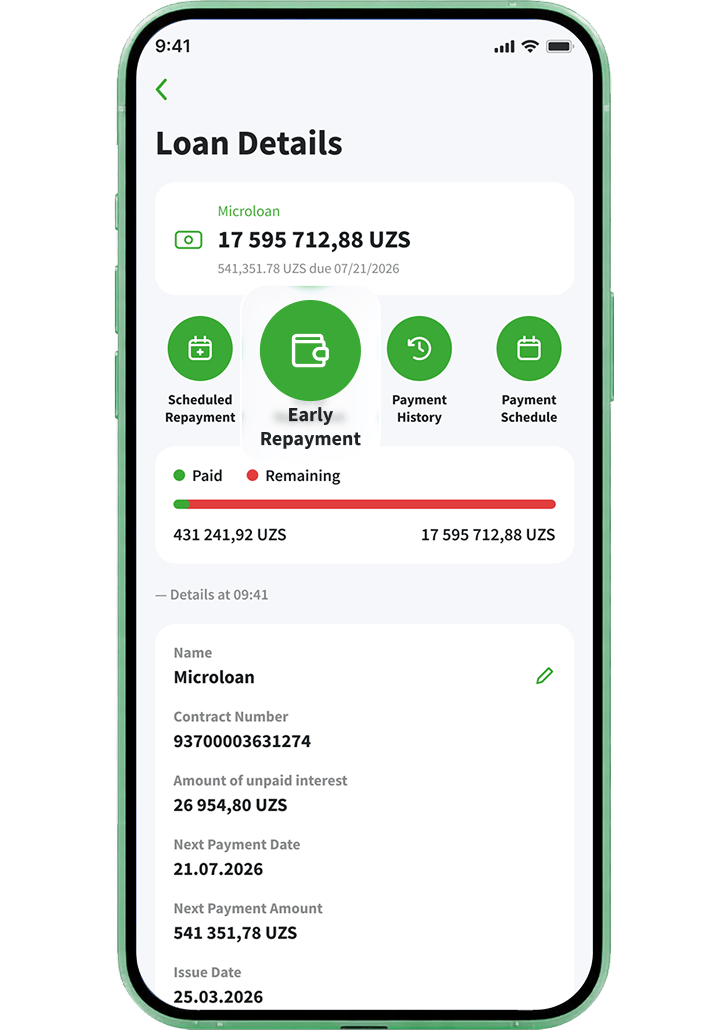
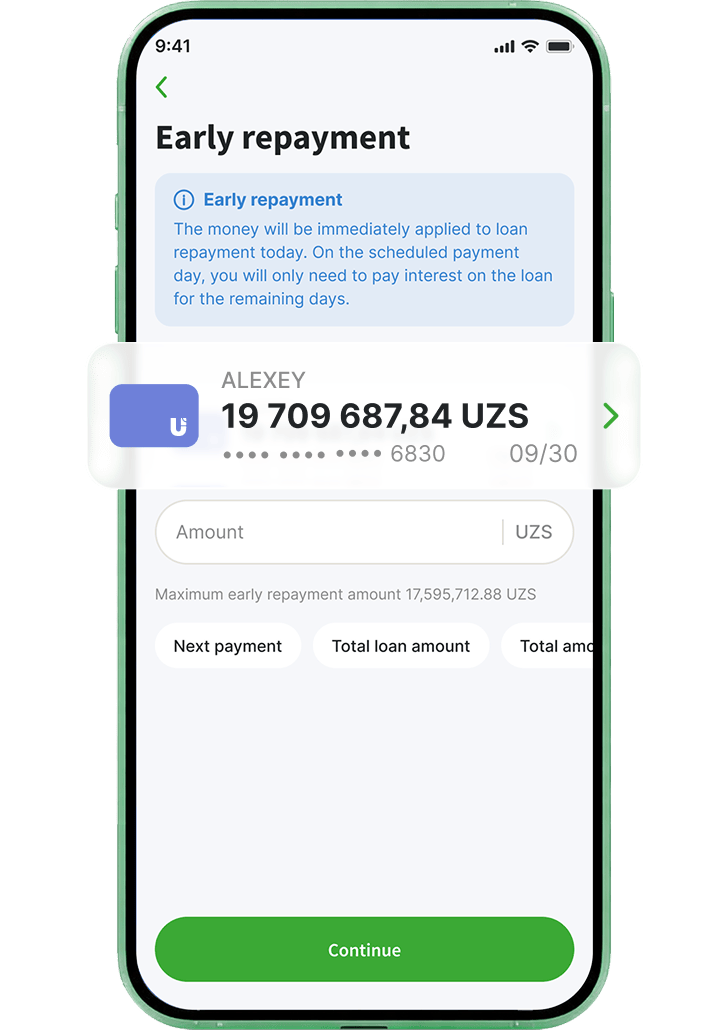
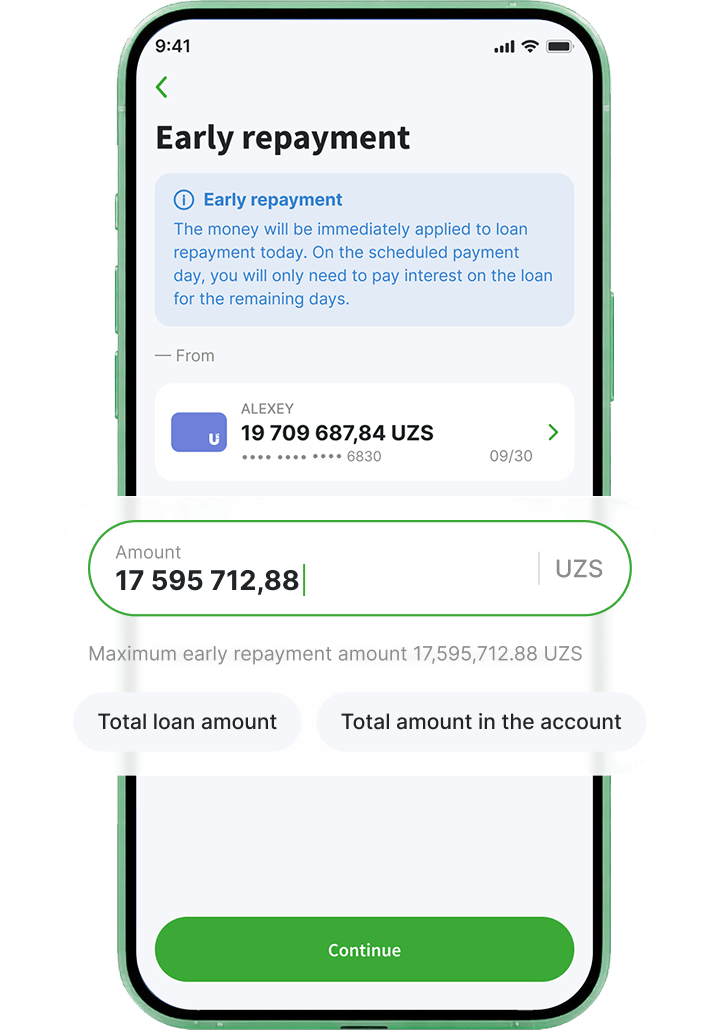
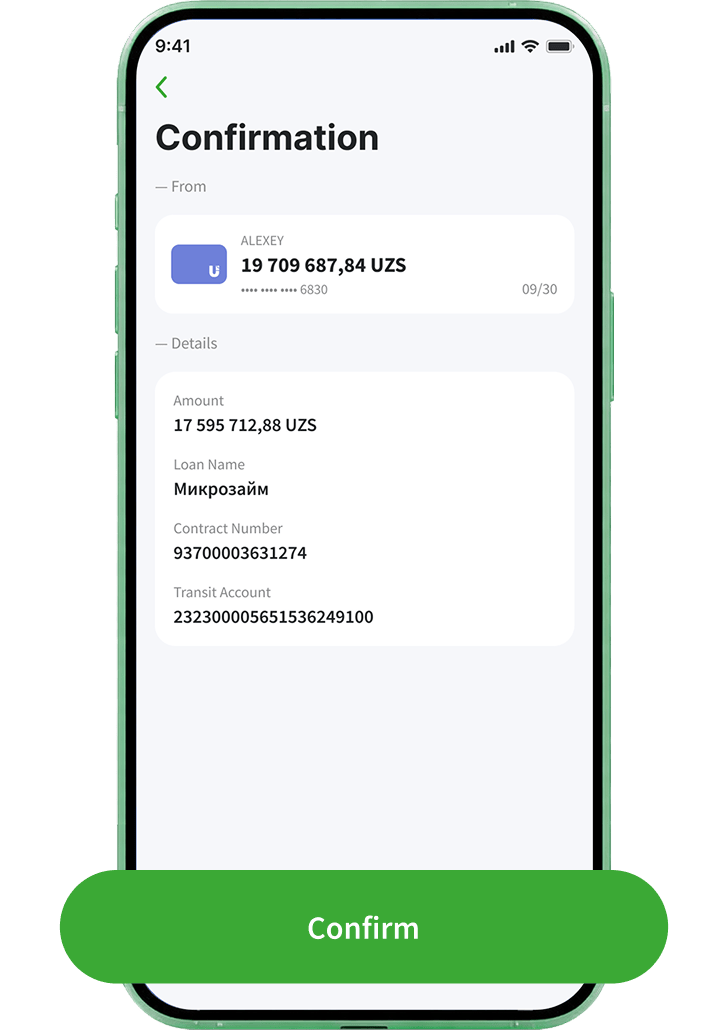
How to Pay Off a Loan in the App

Available in two apps: Ipoteka Mobile (new) and Ipoteka Retail 2.0. Choose the one you use and follow the steps—it’ll take less than a minute.
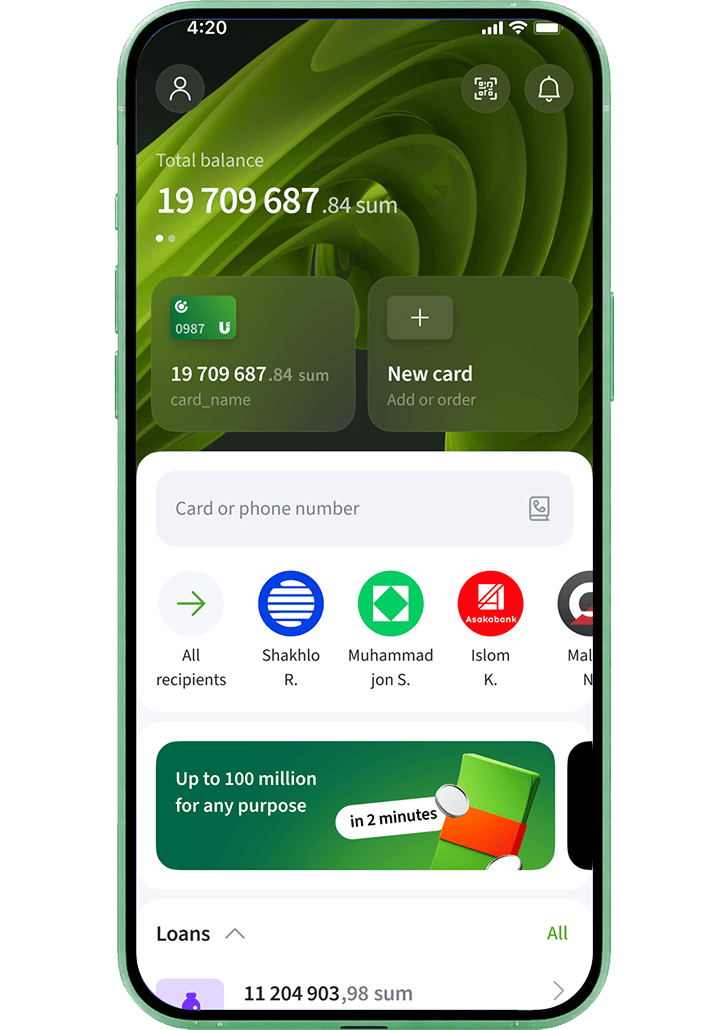
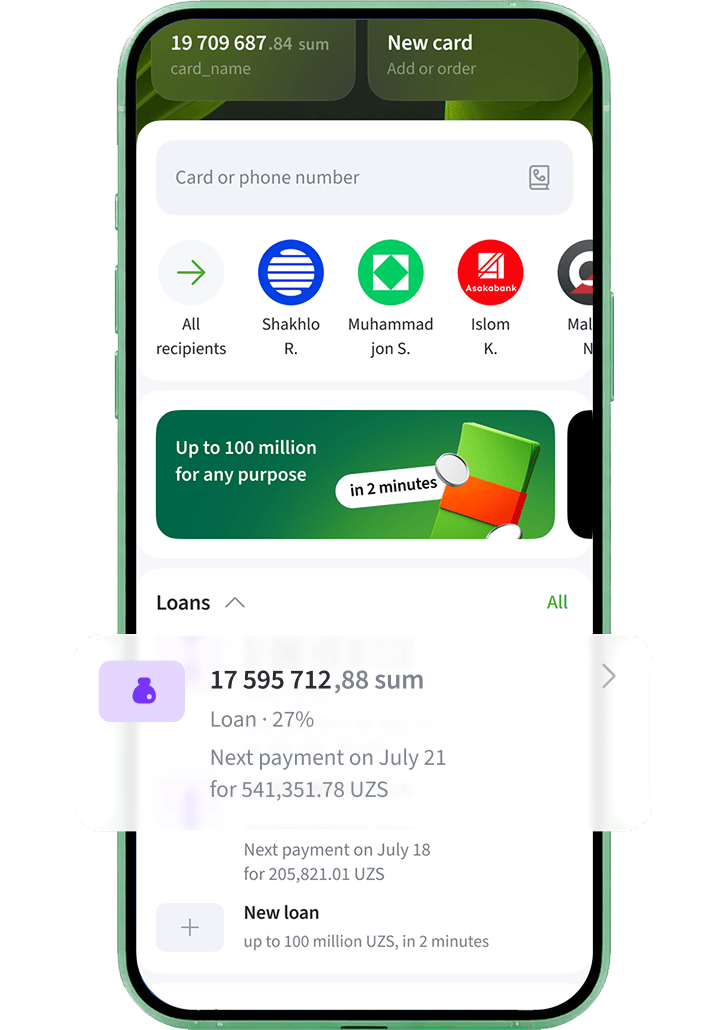
Log in to the app
1
Log in to the app
In the “Loans” section, select the desired loan
2
In the “Loans” section, select the desired loan
Tap Early Repayment
3
Tap Early Repayment
Select a card or account
4
Select a card or account
Enter the amount or select an option
5
Enter the amount or select an option
Review the details and confirm
6
Review the details and confirm
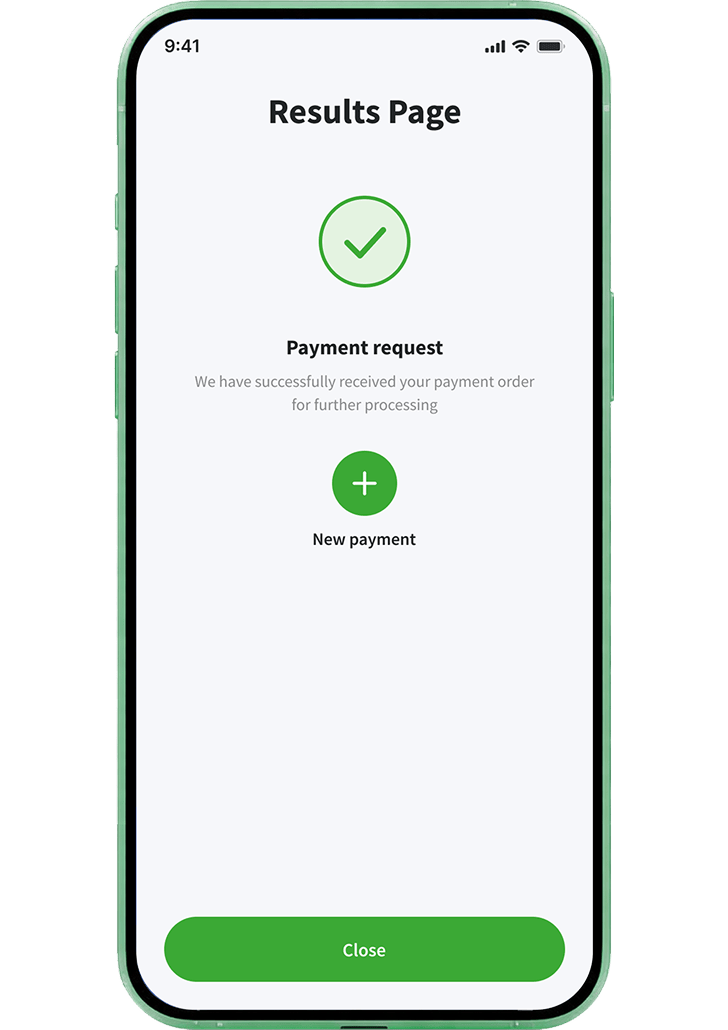
Payment request accepted
7
Payment request accepted
Log in to the app
1
Log in to the app
Select the “Loans” section and the loan you want
2
Select the “Loans” section and the loan you want
Tap Repay
3
Tap Repay
Select Early partial/full loan repayment
4
Select Early partial/full loan repayment
Select the repayment type
5
Select the repayment type
Select Full early repayment
6
Select Full early repayment
Enter the early repayment amount and submit the request
7
Enter the early repayment amount and submit the request
Request accepted
8
Request accepted

How to Pay Off a Loan at a Branch

If it’s more convenient for you to pay in person, visit any branch. The teller will process the payment—you’ll need to provide your information and make the payment.

1

Visit a Branch

Select the nearest Ipoteka Bank branch and go to the teller window.
2

Provide Your Information

Give the teller the borrower’s full name and the loan agreement number. You can find the number in the app under Loans > Detailed Information.
3

Make the Payment

Pay by card or in cash (in sum). The teller will issue a payment receipt.
What to Bring
What to Bring
Passport—the teller may ask for a form of identification.
Processing Time
Processing Time
The payment is credited to your loan account on the same day.
Paying in Advance
Paying in Advance
You can make a payment before the due date—the bank will deduct the required amount on the scheduled date.

Frequently Asked Questions

  • Ipoteka Retail mobile app
  • Our bank's cash registers and ATMs
  • Automatic debit
  • Payme, Click, and Paynet

Install or open the Ipoteka Retail mobile app, where a mini-banner with loan information is displayed on the main screen. Use it to go to the loan section, top up your loan account, select the repayment type you need, confirm the operation, and make a payment

At the bank's branch offices, you can repay your loan using a plastic card or cash in national currency

A credit account is automatically opened when you apply for a loan. You can top up your account in the mobile app. Money will be deducted automatically every month

No, in order to repay the loan, you must use a plastic card in the national currency, or if you have foreign currency in cash, you must convert it into soums

Amendments to the loan agreement at the client's initiative - the commission is 5% of the remaining loan debt, but not more than 500,000 soums

To do this, you need to use the mobile application Install or open the Ipoteka Retail mobile application, where a mini-banner with information about the loan is displayed on the main screen. With its help, you need to go to the loan section, replenish your credit account and select the "Early" repayment type, confirm the operation and make a payment

When you apply for a loan, you will be given a schedule of dates and the amount of your monthly payments. You can pay off your loan in full at any time you like

Daily interest will be accrued, which the bank will deduct automatically from the plastic card

To do this, search for our bank in the Payme, Paynet or Click app and enter your contract number *The bank is not responsible for the incorrect operation of the Payme and Click services

Download the Ipoteka Mobile app and manage your finances without visiting a bank

Paychecks, money transfers, and other services from Ipoteka bank OTP Group are always at your fingertips

Download the Ipoteka Mobile app
bg
Last updated: 03.07.2026